Active development is paused. The audit tool, credit purchases, and existing balances stay operational — no plans to take it down. Credits remain valid until used.
Scan your writing for AI patterns, anywhere you type
The Avoid AI Writing browser extension. Free, local, and private. Your text never leaves your browser unless you explicitly opt in.
Live on the Chrome Web Store. Pattern scan is free and works without an account. Optional sign-in unlocks in-popup deep audits and saved history.
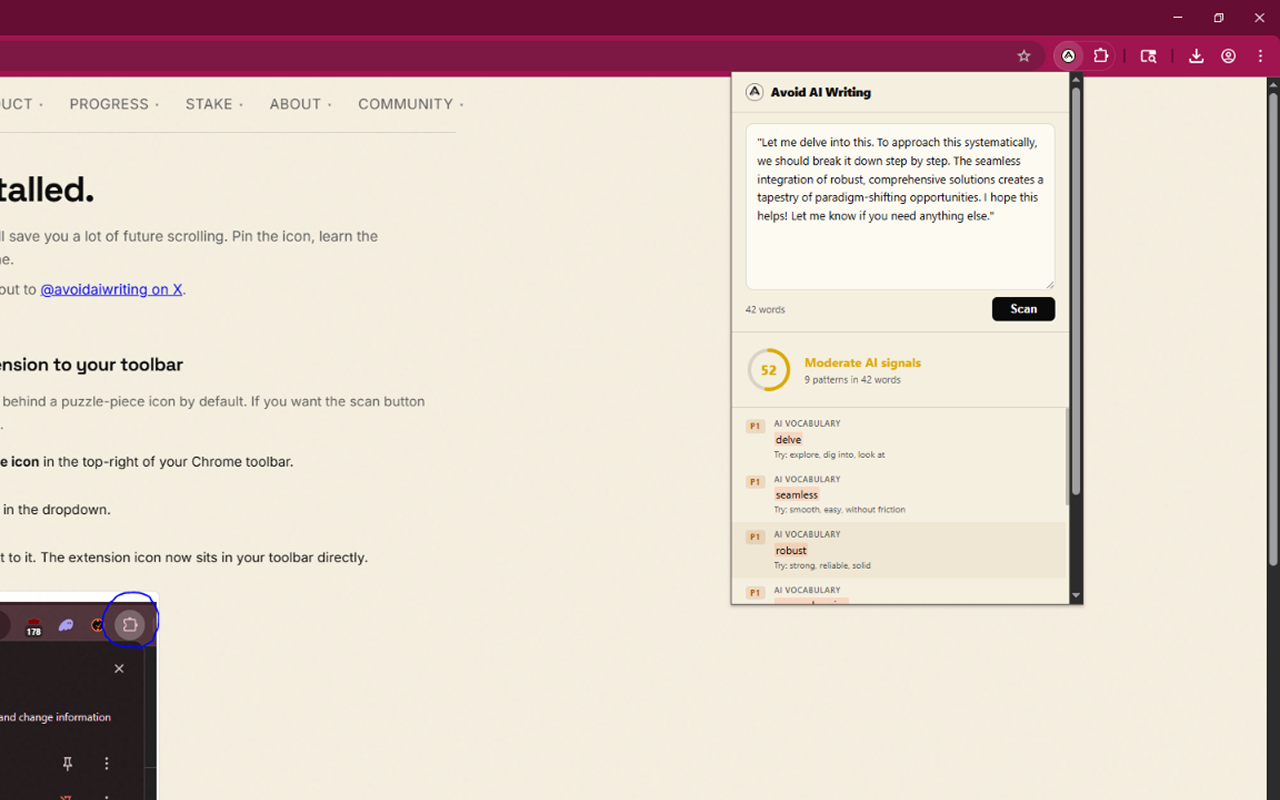
What you get
- Floating scan button appears on every textarea and rich-text editor you focus. One click runs the scan.
- 47 pattern categories: tier-1 AI vocabulary, hollow intensifiers, chatbot artifacts, emotional flatline, cutoff disclaimers, hashtag stuffing, hedge-stacked predictions, AI-tool fingerprints (smart-punct, copy-paste artifacts, unfilled placeholders, citation-markup leaks), and 31 more. All checked locally.
- Color-coded severity from P0 (critical chatbot leakage) to P3 (stylistic) so you know what to fix first.
- Popup paste-and-scan for quick checks on text you've copied from elsewhere.
- Keyboard shortcut.
Alt+Shift+A(Option+Shift+Aon macOS) scans the focused field without clicking. - Options page with a per-site disable list and a toggle for the floating button.
Free vs. deep audit
Free pattern scan
- Client-side pattern detection
- 47 categories, instant results
- No account or sign-in required
- No text transmitted
- Unlimited scans
- Score + flagged issues + suggestions
Deep audit (paid, optional)
- Everything in the free pattern scan
- Full Claude-powered rewrite
- Second-pass cleanup on the rewrite
- Detailed change diff + rationale
- Consumes one credit per run
- Run it in the extension popup (signed in) or open the web app from the in-page scan panel
- Credits purchased on avoidaiwriting.com
Privacy
The pattern scan runs entirely in your browser's JavaScript engine. No text is transmitted, logged, or stored on any server for the scan. Your text only leaves your browser when you explicitly click the deep-audit or rewrite button. There are two deep-audit paths: from the extension popup (signed in), the text is sent directly to the avoidaiwriting.com audit API; from the in-page floating panel, the text is handed off to the web app via chrome.storage.session plus a same-origin postMessage, so the text never appears in the URL or browser history.
Full details: Extension privacy policy.
Install it
One click from the Chrome Web Store. Works in Chrome, Brave, Edge, Arc, and any other Chromium-based browser.
- Open the Chrome Web Store listingClick Add to Chrome, then confirm the permissions prompt. The extension installs in a couple seconds.
- Focus any text field on any site. The floating scan button appears in the bottom-right of the field.
- Click it (or hit
Alt+Shift+A/Option+Shift+A) to scan. Results show inline, with severity-colored highlights for flagged passages.
FAQ
Does it work on Google Docs or Notion?
The scan button appears on standard contenteditable editors, including most rich-text surfaces. Google Docs uses a custom canvas-based editor that doesn't expose text via the DOM in the usual way. For Docs content, use the extension popup's paste-and-scan. Notion works for standard blocks.
Does it cost anything?
The pattern scan is free with no usage limits and no sign-in required. The optional Claude-powered deep audit consumes one credit per run. Credits are purchased on the web app. Signed-in users can run deep audits directly inside the extension popup; everyone else can use the in-page deep-audit button, which opens the web app with the text already handed over.
Do I need to sign in?
No — the pattern scan, suggestions, and inline highlights all work without an account. Optional sign-in (email magic link or Solana wallet) gives you in-popup deep audits, a credit balance, and saved audit history at avoidaiwriting.com/history.
Does it send my text anywhere?
Not for the pattern scan — that's fully local. Text is transmitted only when you explicitly click the deep-audit or rewrite button. From the popup (signed in), it goes directly to the avoidaiwriting.com audit API. From the in-page panel, the handoff uses chrome.storage.session plus a same-origin postMessage, so the text never appears in the URL. Browsers never transmit storage.session entries across the network.
Will it run on banking or authentication pages?
No. The manifest explicitly excludes a list of sensitive origins (major banks, password managers, payment processors, Google authentication) so the extension never touches those sites.